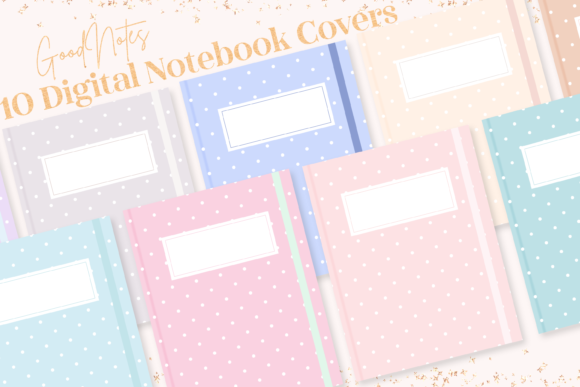
Polka Dot GoodNotes Notebook Covers: Aesthetic & Practical Designs
The first thing you see when you open a digital notebook sets the tone for the entire experience. A plain, default cover can feel uninspiring, while a thoughtfully chosen design can spark immediate creativity and organization. Polka Dot GoodNotes Notebook Covers offer a unique blend of timeless pattern appeal and modern digital functionality. They are not just decorative files; they are the front door to your digital workspace, inviting you in with a sense of calm, style, and intention.
This particular set features ten distinct minimalist polka dot designs in a soft, pastel aesthetic. The beauty lies in their simplicity and versatility. The polka dot pattern is inherently friendly and approachable, reducing visual clutter while adding a touch of personality. The pastel color palette—think soft pinks, blues, lavenders, and mints—promotes a focused, serene environment, which is crucial for productivity and creative flow. Delivered in both PNG and high-resolution PDF formats (8.5 x 11 inches, approx. 2550 × 3300px), these covers are optimized for crisp display on any iPad or tablet, ensuring your digital planner or notebook looks professional and polished.
Transforming Your Digital Planning System
For anyone using GoodNotes for planning, journaling, or note-taking, a cohesive cover system is a game-changer. It moves your setup from a collection of random files to a curated library. Imagine opening your app to see a neatly organized set of notebooks, each with a distinct yet harmonious polka dot cover. This visual organization instantly reduces cognitive load. You can color-code by project, client, or subject area. For instance, use a soft pink cover for personal journals, a cool blue for work project notes, and a mint green for creative brainstorming sessions. This method allows for instant recognition, saving you time and mental energy when switching between tasks.
The minimalist design ensures the covers complement any content inside without competing for attention. They provide a clean, professional backdrop that makes your handwritten notes, typed text, and inserted images stand out. This is especially valuable for freelancers and small business owners who may share screen recordings or presentations of their digital notebooks. A well-designed cover conveys attention to detail and a sense of brand coherence, even if it's just for your own workflow.
Creative Applications Beyond Basic Notebooks
While perfect for standard notebooks, these digital planner covers have far broader applications. Their aesthetic appeal and practical format make them ideal for various creative and professional projects.
- Client Portfolios & Proposals: Create a custom digital portfolio or proposal for a client. A pastel polka dot cover can soften a corporate presentation, making it feel more approachable and creative, which is perfect for designers, marketers, and consultants.
- Digital Recipe Books & Meal Planners: Organize your culinary life with style. Use a different colored cover for different cuisine types or meal plan categories. The cheerful pattern makes the often-tedious task of meal planning feel more enjoyable.
- Educational Resources & Lesson Plans: Educators and tutors can design custom lesson planners or student workbooks. The friendly aesthetic is engaging for learners of all ages, and the consistent design helps create a structured learning environment.
- Hobbyist Collections: Whether you're cataloging knitting patterns, planning a garden, or organizing travel itineraries, a themed set of covers helps compartmentalize your hobbies. It turns a practical notebook into a cherished digital object.
The key is to think of the cover as the title of a chapter. It should give a clear, immediate hint about the content within, helping you and anyone you share it with navigate your digital library intuitively.
How to Implement Your New Covers in GoodNotes
Adding these covers to your GoodNotes template library is a straightforward process that integrates them directly into your creation workflow. Once you have downloaded the file to your iPad, follow these simple steps to make them a permanent part of your toolkit.
- Open GoodNotes and navigate to the main library view.
- Tap the Gear icon in the top right corner to access Settings.
- Select Notebook Templates.
- Tap on the Default Cover preview to open the cover management area.
- Tap to create a new group (you might name it "Polka Dot Pastels" for easy reference).
- Tap the Import button.
- Navigate to the downloaded file, select all the desired covers, and tap Open.
The covers will now be available every time you create a new notebook. Simply select your "Polka Dot Pastels" group and choose the specific design that fits your new project. This eliminates the need to manually add a cover image each time, streamlining your setup process and encouraging you to start new projects with a polished, intentional look.
Maintaining a Cohesive and Effective System
To get the most out of your aesthetic covers, a little upfront planning goes a long way. Consider establishing a simple system for yourself. You might decide that all "work" notebooks use cool-toned polka dots (blues, greens), while "personal" projects use warm tones (pinks, yellows). Alternatively, you could assign a specific color to each major life domain—health, finance, creative projects, and professional development.
Consistency is more important than complexity. Using a unified set of covers like these polka dot designs inherently brings visual order. The goal is to create a digital environment that feels both personal and functional, one that reduces friction and supports your focus. When your tools are organized and aesthetically pleasing, the act of sitting down to work or create becomes more inviting.
Ultimately, these GoodNotes notebook covers are a simple yet powerful tool for personalizing your digital experience. They blend the nostalgic charm of a patterned notebook with the efficiency of modern technology. By investing a few moments in setting them up, you create a more organized, inspiring, and uniquely yours digital space that grows with your projects and goals.