10 Mobile Apps Outline Icons Bundle: A Practical Design Toolkit
When you're building a mobile app, designing a website, or putting together a presentation, the small details make a big difference. Icons are one of those details. They guide users, communicate ideas without words, and give your project a polished, professional feel. The 10 Mobile Apps Outline Icons Bundle is a straightforward collection designed to cover some of the most common interface needs you'll encounter.
What's Inside This Icon Set
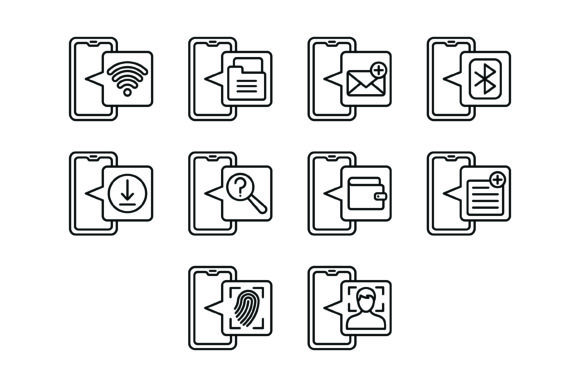
This bundle includes ten essential icons that most digital projects eventually need:
- Wifi Icon
- File Management Icon
- Email Icon
- Bluetooth Icon
- Downloads Icon
- Search Icon
- Wallet Icon
- Note Icon
- Fingerprint Scan Icon
- Face Scan Icon
Each icon follows a clean outline style. That means thin, consistent strokes with no filled shapes or heavy visual weight. The overall personality is minimal and modern — the kind of aesthetic you see in contemporary app interfaces, SaaS dashboards, and tech-forward brand identities. These aren't decorative or playful. They're functional, which is exactly what you want when icons need to sit alongside text, buttons, and other interface elements without competing for attention.
The visual consistency across all ten icons matters more than you might think. When icons share the same stroke weight, corner radius, and level of detail, they create a cohesive look. Mixing icon styles — say, a heavy filled icon next to a delicate outline — makes a design feel disjointed. This bundle avoids that problem entirely.
File Formats That Actually Work for Real Projects
One practical strength of the 10 Mobile Apps Outline Icons Bundle is the range of included formats. The zip file contains AI, EPS, JPG, PNG with transparent background, and SVG files. That covers nearly every workflow you're likely to run into.
If you're working in Adobe Illustrator or Affinity Designer, the AI and EPS vector files let you edit paths, adjust stroke weights, and resize without any quality loss. For web development, SVG files are ideal because they scale perfectly at any resolution and keep file sizes small. The PNG files with transparent backgrounds are ready to drop into presentations, social media graphics, or tools like Canva and Figma without fussing over background removal.
This variety means you're not locked into a single platform. A small business owner might use the PNG versions for a quick social media post, while a developer integrates the SVGs into a mobile app interface. A marketer might pull the JPGs into a pitch deck. The point is, the bundle meets you where you already work rather than forcing you to convert files or buy additional assets.
Where These Icons Fit Best
Icons from the 10 Mobile Apps Outline Icons Bundle work well across a surprisingly wide range of projects. Here are some realistic scenarios where they'd serve you well:
- Mobile app interfaces — The search, wifi, bluetooth, fingerprint, and face scan icons are practically standard in modern app navigation and settings screens.
- Website design — Use the email and download icons in footers, contact sections, or call-to-action buttons.
- SaaS dashboards — File management and note icons help users quickly identify features in productivity tools.
- Presentations — Clean outline icons add visual interest to slides without looking cluttered or unprofessional.
- Print materials — Because the vector formats scale infinitely, you can use these on business cards, brochures, or packaging without worrying about pixelation.
- Educational content and templates — Bloggers and content creators can use these to illustrate tutorials, guides, or infographics.
The outline style also plays well with a variety of font pairings. Because the icons are visually lightweight, they won't clash with bold display typefaces or compete with detailed serif fonts in editorial layouts. They sit comfortably next to both sans serif and serif font choices, which gives you flexibility when building out a broader brand identity.
How Icons Influence the Way People Experience Your Design
It's easy to treat icons as decoration, but they do real work in a design. The right icons improve readability by breaking up dense text and giving the eye anchor points. They strengthen visual hierarchy by signaling what's important — a download icon next to a button tells users exactly what will happen when they click.
Icons also shape brand perception. A consistent set of clean, modern outline icons communicates professionalism and attention to detail. Sloppy or mismatched icons, on the other hand, can make even a well-designed site feel amateur. The 10 Mobile Apps Outline Icons Bundle helps maintain that consistency because every icon was designed with the same visual language.
For entrepreneurs and small business owners building their own websites or apps, having a reliable icon set saves time and reduces guesswork. You don't need to hunt through dozens of free icon libraries hoping to find pieces that look like they belong together. This bundle gives you ten commonly needed icons that already work as a unit.
Practical Tips for Using This Bundle
A few recommendations as you work with these icons:
- Match stroke weights to your typography. If you're using a light-weight sans serif font, the default icon strokes should complement it well. If your typeface is heavier, you might want to slightly thicken the icon strokes in the vector files for better visual balance.
- Test at small sizes. Icons that look great at 64 pixels might lose clarity at 16 pixels. Check how the fingerprint and face scan icons read at smaller sizes, since those have more detail than something like the wifi icon.
- Use consistent spacing. Give each icon the same amount of breathing room around it. Inconsistent padding is one of the most common mistakes in icon implementation.
- Consider color thoughtfully. Outline icons look sharp in a single color — black, white, or a brand accent. If you do add color, keep it consistent across all ten icons rather than assigning random colors to each one.
- Review the SVG files for web use. SVGs are the best format for responsive design because they scale without losing quality and load quickly. If you're building a website or web app, start with these.
A Solid Starting Point for Everyday Design Needs
The 10 Mobile Apps Outline Icons Bundle isn't trying to be everything. It's a focused, practical set of design assets that covers common interface and communication needs. The outline style is versatile enough to work across web design, mobile apps, print, presentations, and social media graphics. The included file formats mean you can use them in almost any tool without conversion headaches.
For designers building out a client project, marketers creating branded materials, or small business owners putting together their first app or website, having a clean, consistent icon set ready to go is genuinely useful. It removes one more variable from the design process and lets you focus on the bigger picture — whether that's logo design, editorial design, packaging design, or building a complete brand identity from scratch.
Ten icons won't solve every design challenge, but they'll handle the ones that come up most often. And sometimes, that's exactly what you need.