Integrating Cool Emoji Outline Icons into Your Professional Workflow
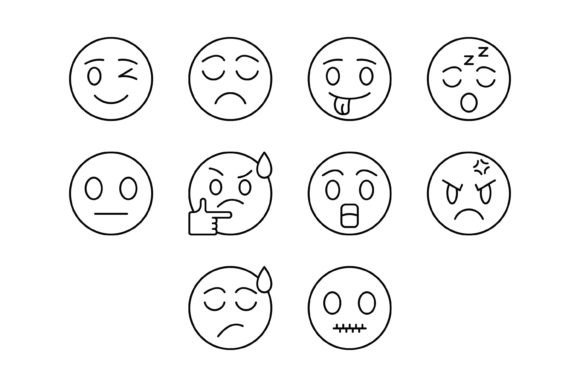
In the modern digital landscape, visual communication is not merely decorative; it is functional. Whether you are building a mobile application, designing a marketing website, or preparing a corporate presentation, the visual language you choose directly impacts user engagement and information retention. The Cool Emoji Outline Icon set is designed to bridge the gap between emotional expression and professional clarity. It offers a comprehensive library of 100 vector-based emoji icons that fit seamlessly into various stages of a project lifecycle, from initial brainstorming to final deployment.
The Technical Foundation: File Formats and Compatibility
One of the primary bottlenecks in any creative workflow is format conversion. A designer might need a vector for scaling, while a web developer requires transparency for CSS integration, and a content manager might need a quick static image for a blog post. The Cool Emoji Outline Icon package eliminates this friction by providing five distinct file formats in a single ZIP file: AI, EPS, JPG, PNG (Transparent), and SVG.
Vector Formats: AI and EPS
The AI (Adobe Illustrator) and EPS (Encapsulated PostScript) files are the backbone of the design process. These formats are essential during the early and middle stages of a project. If you are working on a logo, creating custom templates, or designing print media, these vector files allow for infinite scalability without loss of quality. They interact directly with professional design software like Adobe Illustrator, Affinity Designer, or CorelDRAW. By utilizing these files, you maintain full control over stroke weight and color, ensuring that the icons align perfectly with your brand guidelines.
Web and Digital Formats: SVG, PNG, and JPG
For the implementation phase, specifically for web and mobile environments, the SVG (Scalable Vector Graphics) and PNG formats are critical. SVGs are the gold standard for modern web development because they are code-based, lightweight, and scale perfectly on high-resolution retina displays. The PNG files included in the set come with a transparent background, which is vital for overlaying icons on colored sections or complex backgrounds without the "white box" effect. Finally, the JPG format serves as a universal fallback, useful for quick previews, email newsletters, or legacy systems where vector support is limited.
Practical Application: From Planning to Execution
Understanding where the Cool Emoji Outline Icon fits into your specific workflow helps maximize its value. These assets are not limited to one type of user; they serve distinct functions for different roles.
For UI/UX Designers and App Developers
When designing a user interface, consistency is paramount. Outlined icons are preferred in modern UI design for their "light" feel, which prevents the interface from looking cluttered. During the wireframing stage, you can use the AI or EPS files to place placeholder emojis that signify reactions or notifications. As the project moves to the prototyping stage in tools like Figma or Sketch, you can import the SVG files. This ensures that the icons are interactive and responsive to different screen sizes. Because the set includes 100 variations, you can cover a wide range of emotional states—from a simple "thumbs up" to complex "thinking face" scenarios—without needing to source icons from multiple libraries.
For Marketers and Content Creators
Content strategy often relies on visual breaks to maintain reader attention. If you are a blogger or a social media manager, the Cool Emoji Outline Icon serves as a powerful tool for emphasis. Instead of using generic text headers, you can use these outline icons to highlight key features in a product review or to break up a long newsletter. The PNG format is particularly useful here. You can drag and drop these transparent assets directly into Canva, Mailchimp, or WordPress without worrying about background clashes. This speeds up the production process, allowing you to focus on the message rather than spending time removing backgrounds from stock images.
For Educators and Presenters
Presentations often suffer from information overload. Visual cues help the audience process complex data faster. When creating educational materials or corporate decks, the Cool Emoji Outline Icon can be used to represent concepts like "feedback," "approval," or "error." Because the icons are outlines, they maintain a professional aesthetic suitable for formal business environments while still conveying a human, approachable tone. You can integrate these icons into PowerPoint or Keynote templates to create a consistent visual theme throughout your lecture or pitch.
Streamlining the Design Process
Efficiency in creative work often comes down to how well you organize your assets. The Cool Emoji Outline Icon set is designed for "ready-to-use" implementation, but proper integration requires a structured approach.
Asset Management and Organization
Before starting a project, download and unzip the file. It is advisable to sort the files by format type into your project’s asset library. For example, keep the AI/EPS files in a "Master Design" folder and the SVG/PNG files in a "Web Assets" folder. This separation ensures that developers do not accidentally access heavy vector files, and designers do not use low-resolution JPGs for print. By organizing the 100 icons this way, you create a shared resource that multiple team members can access without confusion.
Customization and Scalability
A key feature of this icon set is its editability. In a real-world workflow, you rarely use an icon exactly as it is downloaded. You might need to match a specific hex code for a brand color or adjust the stroke width to match other typography. Because the Cool Emoji Outline Icon files are vector-based, they are easy to edit. You can ungroup the vector paths in your preferred editor and tweak the curves. This scalability is crucial for responsive design; an icon that looks good on a desktop monitor must also look sharp on a 4-inch mobile screen. The SVG format handles this scaling automatically, ensuring your UI remains crisp across all devices.
Ensuring Quality Control and Consistency
When using external assets, quality control is a necessary step. One common issue with mixed icon sets is inconsistent line weight. If one emoji has a 2px stroke and another has a 4px stroke, the design looks amateurish.
The Cool Emoji Outline Icon set is designed with maximum usability in mind, meaning the line work is consistent across the entire library of 100 icons. However, during the integration phase, you should still test the icons against your specific background colors. While the PNGs have transparent backgrounds, ensure that the outline color (usually black or dark grey by default) contrasts sufficiently with your site’s background. If it doesn't, use the vector files to quickly change the stroke color to white or a lighter shade. This quality control step ensures that the icons are not just present, but functional and legible.
Long-Term Use and Versatility
Investing in a high-quality icon set is a long-term decision. The Cool Emoji Outline Icon is not a one-time use asset. Because it covers a broad range of human expressions and common symbols, it can be repurposed across multiple campaigns, products, and updates.
For instance, the same "smile" icon used in a mobile app’s feedback form can be reused in the company’s internal HR portal or on the packaging of a physical product. By standardizing your visual assets with this set, you build a cohesive brand identity that spans digital and physical spaces. The versatility of the formats ensures that as technology evolves—whether you move from a website to a mobile app, or from digital to print—the icons remain compatible and high-quality.
Ultimately, the Cool Emoji Outline Icon set is a utility asset. It is built to facilitate communication, streamline production workflows, and maintain visual consistency. By integrating these icons into your toolkit, you equip yourself with a flexible resource that adapts to the specific demands of your project, ensuring that your final output is both professional and engaging. We hope you find this collection as useful in your workflow as it is comprehensive in its design.